
TL;DR
If RAM® Mounts seem overwhelming at first, just focus on the structure:
RAM® System = holder + arm + plate + base
Then narrow it down by:
- Device
- Mounting location
- Ball size
- Arm length
- Hole pattern
Once you understand those five things, the product line starts to make sense very quickly.
The Easy Way: Use Our RAM® Mount Builder
Don’t want to figure it out yourself? We built a tool that does the work for you.
Our RAM® Mount Builder walks you through selecting the right components step by step. Just tell it what device you want to mount, and it will show you exactly which holder, arm, and base you need.
No guesswork. No compatibility worries. Just pick your device and go.
Try the RAM® Mount Builder Now
How to Choose the Right RAM® Setup
If you’re trying to build a RAM® Mount system, the cleanest way to think about it is this:
Step 1: Start with the Device (What Holder?)
What are you mounting? An iPad, phone, tablet, GPS, transceiver, radio, fish finder, or something else?
Step 2: Decide How the Device Will Attach
Does it use AMPS? VESA? A specific cradle? A powered dock? A form-fit holder? A universal holder?
Step 3: Choose the Ball Size
Pick B, C, or D based on the device size, weight, and how rough the environment is likely to be.
HINT: B Size is usually the right answer.
Step 4: Choose the Arm Length
Short for compact rigidity, medium for most applications, long only when extra reach is needed.
HINT: Standard is usually the right answer.
Step 5: Choose the Base
This depends entirely on where the mount is going: yoke, rail, handlebar, panel, floor, seat bolt, windshield, track, or something else.
That’s really the RAM® system in a nutshell.
How the RAM® Mount System Works
If you’re new to RAM® Mounts, the product line can look confusing at first. There are balls, arms, plates, cradles, bases, and a long list of part numbers that don’t mean much until you understand the logic behind them.
The good news is that the system is actually simple once you see the structure.
At its core, a RAM® Mount is a modular mounting system designed to let you mount almost any device in almost any vehicle or environment. Phones, tablets, GPS units, radios, laptops, fish finders, cameras, and many other devices can all be supported by combining three basic components: a base, an arm, and a holder or adapter.
That modularity is one of the main reasons RAM® has become so widely used in aviation, motorcycles, marine applications, trucking, forklifts, public safety, and industrial fleets.
What Makes RAM® Mounts Different?
RAM®‘s system is built around three main ideas: ruggedness, adjustability, and modularity.
| Feature | Why It Matters |
|---|---|
| Ruggedness | Designed for real-world environments—vehicles, boats, aircraft, and other vibration-prone settings—not just smooth dashboards and office desks |
| Adjustability | Ball-and-socket design makes it easy to position a device exactly where you want it |
| Modularity | Mix and match bases, arm lengths, and holders to create a setup that fits your exact application |
RAM® also backs many of its components with a lifetime warranty.
The 3 Basic Parts of a RAM® Mount
Most RAM® mounting systems are built from three parts:
1. Base
This is the part that attaches to the vehicle or mounting surface. It might be a drill-down base, suction cup, yoke clamp, handlebar clamp, rail mount, bolt-head adapter, magnetic base, adhesive base, or something more specialized.
2. Double Socket Arm
The arm connects the ball on the base to the ball on the holder or adapter. This is what gives the mount its adjustability. RAM® offers short, medium, and long arm lengths in several ball sizes.
3. Holder or Adapter
This is the device-side connection. It could be a form-fit cradle, a universal holder, a powered dock, or a simple plate or ball adapter that bolts to the back of a cradle or device.
That’s the whole system: mount to the vehicle, connect with an arm, and attach the device.
Understanding RAM® Ball Sizes
One of the biggest keys to choosing the right RAM® Mount is picking the correct ball size.
RAM® uses several ball sizes, but the most common are:
B Size (1” ball)
The most common RAM® size. Typically used for lighter handheld devices like phones, GPS units, cameras, cup holders, and smaller tablets.
Weight rating: Up to 2 lbs standard / 1 lb rugged environments
C Size (1.5” ball)
The next step up. Commonly used for heavier or larger devices like tablets, some fish finders, small monitors, and laptops.
Weight rating: Up to 4 lbs standard / 3 lbs rugged environments
D Size (2.25” ball)
For larger monitors, larger fish finders, vehicle-mounted computers, and other heavy-duty setups.
Weight rating: Up to 6 lbs standard / 5 lbs rugged environments
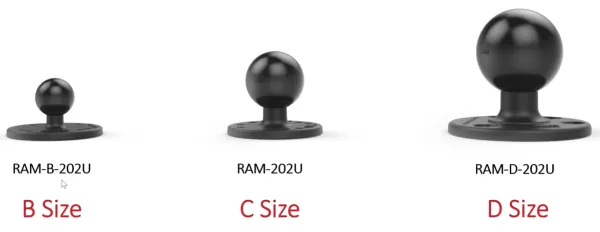
RAM® also makes A size and E size components, but those are much less common. A size is small and specialized. E size is very large and usually reserved for heavy-duty military or industrial applications.
Weight Is Not the Only Factor
This is where people often make a mistake.
You don’t choose a RAM® ball size based only on the weight of the device. You also need to consider the environment. A device mounted in a calm, low-vibration application might work well with one size, while that same device in a rougher environment may need the next size up.
RAM® specifically points out that vibration and shock matter when selecting a mount, not just raw device size or weight.
In plain terms: if the application is rough, aggressive, or highly exposed to vibration, it’s usually smart to move up in ball size. But, for most applications the B Size ball is right choice.
RAM® Arms: Short, Medium, and Long
The double socket arm is the part between the two balls. It’s what lets you reposition the mount and lock it down.
RAM® offers most common arms in short, medium, and long lengths:
| Arm Length | Best For |
|---|---|
| Short | 2.38” Long. Most rigid, low-profile setup with minimal leverage |
| Standard | 3.69” Long. General-purpose mounting (most common choice) |
| Long | 6” Long. Extra reach and flexibility (creates more leverage - consider vibration) |
RAM® Plates: Round, Diamond, and Square
This is one of the most useful things to understand, because it helps decode a lot of RAM® part numbers.
Round Plates (part numbers ending in 202)
Round plates commonly end in 202, such as RAM-B-202U. These are very common RAM® drill-down ball bases and typically use the standard AMPS 4-hole pattern.
Diamond Plates (part numbers ending in 238)
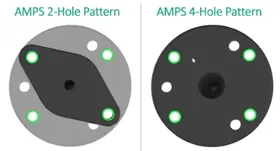
Diamond plates commonly end in 238, such as RAM-B-238U. These use a 2-hole AMPS-compatible pattern and line up diagonally with the AMPS 4-hole layout. That makes them extremely common for cradles and device holders.
Square Plates (part numbers ending in 347)
Square plates commonly end in 347. These are less common and are typically used in a narrower set of applications, including some Garmin zumo, TomTom, and Magellan GPS mounts.
A Useful Rule of Thumb
If a device or cradle uses a round AMPS-style pattern, it can often work with either a round plate or a diamond plate, depending on the hole alignment you need. In many cases, the diamond plate is simply using two diagonal holes from the AMPS pattern. But if the application requires a different hole layout, then the plate choice becomes more specific.
What Is the AMPS Hole Pattern?
The AMPS hole pattern is an industry-standard 4-hole rectangular layout used by many device cradles, docks, and mounting adapters.
Standard spacing: 1.188” × 1.5”
This matters because a huge number of third-party cradles and RAM® holders use the AMPS pattern, which makes them easy to integrate into the RAM® ecosystem. RAM® round plates ending in 202 commonly use the AMPS 4-hole pattern, while diamond plates ending in 238 connect using two diagonal holes from that same pattern.
What Is VESA?
VESA is another standardized hole pattern, most commonly used on monitors and displays.
The two most common VESA patterns are:
- 75mm × 75mm
- 100mm × 100mm
If you’re mounting a monitor or display rather than a handheld device, you may need a VESA-compatible RAM® plate rather than an AMPS-based one.
Materials: Why RAM® Mounts Hold Up
RAM® uses a mix of materials depending on the job of the part:
- Marine-grade aluminum with black powder-coated finish for bases and structural components
- High-strength composite materials for certain holders, cradles, and lighter-weight components
The company balances strength, weight, durability, corrosion resistance, and cost depending on where the part is used in the system.
That’s also why a holder might be composite while a base is metal. The base may need maximum rigidity, while the holder may benefit from a little controlled flex to make inserting and removing the device easier.
Common Base Types
RAM®‘s flexibility comes largely from the wide range of base options available:
- Drill-down bases
- Suction cup bases
- Adhesive bases
- Yoke clamp bases
- Handlebar and rail clamps
- Bolt-head adapter bases
- Magnetic bases
- Track bases
- Fork stem bases
- Cup holder wedge mounts
- Seat wedge mounts
That variety is what allows the same device holder to be used in an airplane, a truck, a forklift, a boat, or a side-by-side with the right combination of parts.
Common Holder Types
RAM® holders generally fall into a few categories:
| Holder Type | Description |
|---|---|
| Form-fit holders | Designed for specific devices such as iPad, phone, tablet, GPS, transceiver and more. |
| Universal holders | Adjustable holders sized for device dimensions |
| Powered docks | Include charging or data connection |
| Locking docks | For theft deterrence or fleet use |
| Adapter plates | Bolt directly to a device or third-party cradle |
RAM® also makes solutions with cable management, quick release features, keyed locks, charging options, docking stations, and shock or vibration accessories for rough environments.
Why RAM® Mounts Are So Popular
The reason RAM® has such a strong following is not just that they make rugged parts. It’s that the whole system is modular enough to solve a huge range of problems without forcing you into one fixed configuration.
A customer can often reuse part of an existing setup, swap one component, and end up with a completely different mounting solution. That matters in aviation, marine, fleet, and industrial applications where needs change and equipment changes.
With RAM® Mounts, you can mount just about anything, anywhere. Any Device to Any Surface.
Why Buy Your RAM® Mount System From MyPilotStore?
MyPilotStore has been a RAM® Authorized Dealer for more than 15 years, and we now stock over 500 RAM® products for fast, reliable fulfillment. With same day shipping on in-stock items, you can get the mounting components you need without delay.
More importantly, we do more than just sell RAM® part numbers. We provide expert service to help you choose the right combination of base, arm, plate, and holder for your application.
Try the RAM® Mount Builder
Not sure which parts you need? Our RAM® Mount Builder takes the guesswork out of configuring your system. Just select your device type, brand, and model, and the builder will show you exactly which components work together. It’s the fastest way to get the right mount the first time.
If you are buying RAM® Mounts, the goal is not just to buy parts. It is to end up with a setup that actually works. That is where we add value.
Ready to find your RAM® Mount? Browse our complete selection of RAM® Mount products or use our RAM® Mount Builder for guided help. Call us today: 480-556-0500 or email [email protected]
RAM® and RAM® Mounts are registered trademarks of National Products Inc. MyPilotStore is an authorized RAM® Mounts dealer and is not affiliated with National Products Inc. AMPS and VESA are hole-pattern standards referenced for compatibility only.