
We receive calls and emails about this issue nearly every week:
“I purchased the David Clark headset exactly one month ago and only used them twice. All of a sudden the left ear stopped working.”
“My son just texted that the headset we ordered only has sound coming out of one side. How can we get a replacement?”
If this sounds familiar, you’re actually in luck! Your headset is not defective. This is one of the most common “problems” we hear about, and the fix takes about two seconds.
The Simple Solution
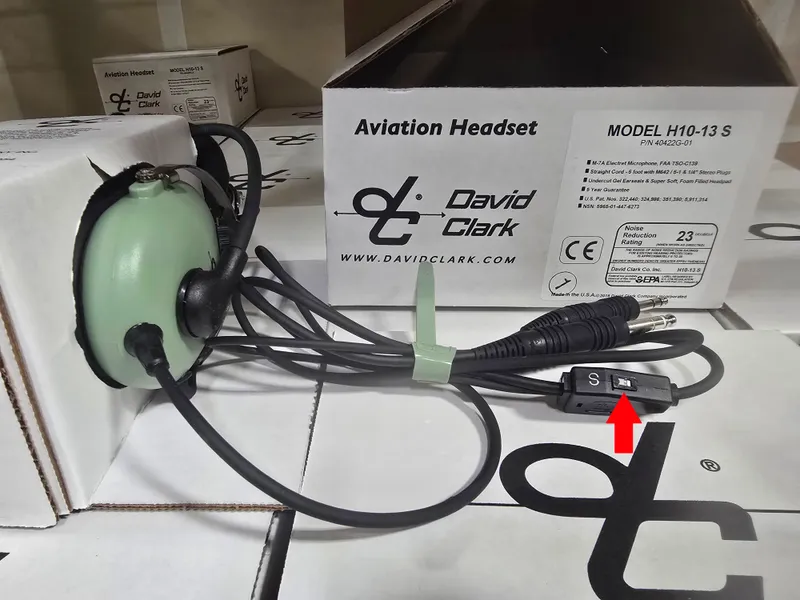
Look at your headset cable (or on the earcups). You’ll find a small switch labeled S (Stereo) and M (Mono). Flip it to M for Mono.
That’s it. Problem solved.
Why Does This Happen?
Aircraft radios transmit audio in mono - a single audio channel sent to both ears equally. When your headset is set to Stereo mode, it expects two separate audio channels (left and right), like music from your phone or MP3 player.
When you connect a stereo headset to a mono audio source (your aircraft radio) while in Stereo mode, the audio only plays through one ear. This is actually the headset working exactly as designed - it’s just not configured correctly for your audio source.
When to Use Each Mode
| Mode | When to Use |
|---|---|
| Mono (M) | Connected to aircraft radio or intercom - use this 99% of the time |
| Stereo (S) | Connected to a stereo music source (phone, tablet, entertainment system) |
Pro tip: Unless you’re actively listening to stereo music through your headset, keep it in Mono mode. You’ll avoid this confusion entirely.
Where Is the Stereo/Mono Switch?
The location varies by headset model:
- David Clark H10-13S: On the cable below the earcups (shown in the image above)
- Bose A20/A30: In the battery box and controlled by a dip switch.
- Other stereo headsets: Check the cable or the bottom / side of one of the earcups
Look for a small sliding switch with “S” and “M” markings. Some headsets may label it “STEREO” and “MONO” instead.
Still Only Hearing in One Ear?
If switching to Mono mode doesn’t solve the issue:
- Check your aircraft’s audio panel: Make sure the intercom is set to mono output
- Inspect the plugs: Ensure both the mic and headphone plugs are fully seated in the jacks
- Try a different jack: Test in another seat position to rule out a panel issue
- Examine the cable: Look for any damage, kinks, or fraying near the plugs
If none of these steps help, then it may be time to contact us or the manufacturer for warranty service. But in our experience, 9.9 out of 10 “defective” headset calls are resolved by simply flipping that switch.
The David Clark H10-13S
The David Clark H10-13S is the stereo version of the legendary H10-13.4. It’s perfect for pilots who want the option to listen to stereo music in flight while maintaining the rugged durability David Clark is known for. It also has dual volume controls so you can control the volume in each ear independantly.

David Clark H10-13S Stereo Headset
SKU: 1028
The stereo version of David Clark’s legendary H10-13.4. Features gel ear seals, M-7A noise-cancelling microphone, and the reliability pilots have trusted for decades. Includes stereo/mono switch for versatile connectivity.
Summary
If your aviation headset suddenly only plays in one ear, don’t panic. Before assuming it’s broken:
- Find the stereo/mono switch on your cable or headset
- Flip it to Mono (M)
- Enjoy full audio in both ears
This simple setting adjustment has saved countless pilots from unnecessary returns and replacements. Now you can get back to flying with full situational awareness in both ears.