
Stratus 4 ADS-B Receiver by Appareo

- (2)

Free Shipping!
Extended Holiday Returns through January 11



OUT OF STOCK - Expected Back Friday, December 4
You can place an order now and will ship as soon as it comes back in stock. You will NOT be charged until we are ready to ship your order and you can cancel at any time prior to shipment with no penalty. Your order is simply holding your place in line and all orders are filled on a first-come, first-served basis.
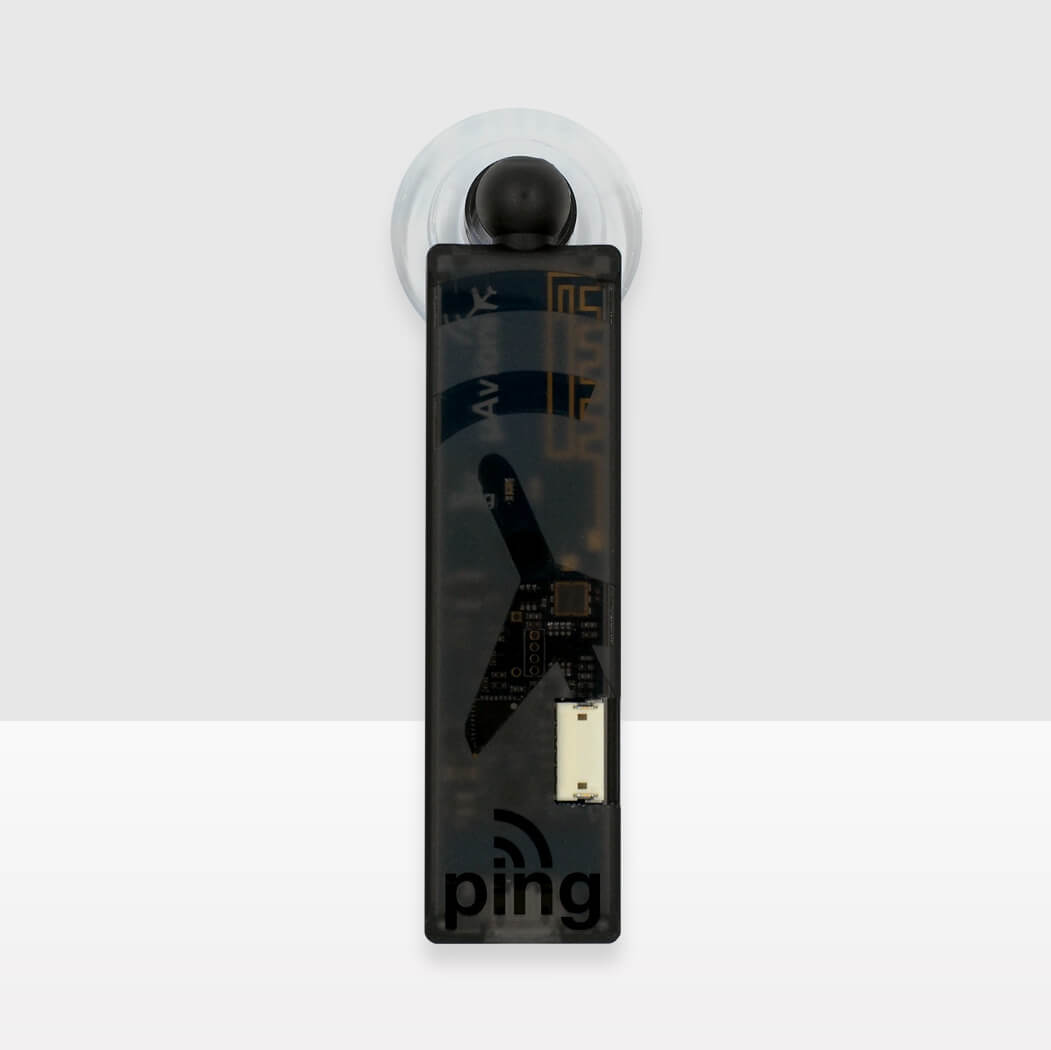
The uAvionix pingUSB is a compact dual-band ADS-B traffic receiver that shows nearby aircraft on your EFB app over Wi-Fi, or on a PC over USB. It receives both 978 MHz UAT and 1090 MHz ES, so you see ADS-B equipped traffic on both frequencies.
Live ADS-B traffic on your EFB: pingUSB sends real-time traffic to GDL 90 compatible apps over its built-in Wi-Fi, with up to 4 devices connected at once. Compatible apps include ForeFlight Mobile, EasyVFR, AirMate, OzRunways, WingX, iFly EFB, FlyQ EFB, Avare, FltPlan Go, Naviator, SkyDemon and others. Power it from any USB power source and stick it to a window with the included suction cup mount. pingUSB has no GPS of its own, so your tablet or phone supplies the position.
Note: uAvionix says pingUSB was not designed for in-flight use. If you use it in flight, they recommend a 5 V USB port, finding the mounting spot with the best reception, putting your tablet in Airplane Mode with Wi-Fi turned back on, and making pingUSB the only saved Wi-Fi network.
Traffic on your AV-30: With an AV-Link installed, the AV-30 can show pingUSB traffic on its traffic page, as long as the AV-30 also has a separate GPS source, such as a panel GPS or tailBeaconX.
USB and MAVLink connectivity: Plugged into a Windows PC, pingUSB works with the free Virtual Radar Server for real-time aircraft identification and visualization, using the provided Windows driver. A MAVLink serial interface supports data transfer at 57,600 bps, and pingUSB is plug-and-play compatible with the senseFly eMotion UAS ground control station software.
Configure ping transponders and transceivers: An optional JST port lets pingUSB program compatible uAvionix ping ADS-B transponders and transceivers.
Traffic only: pingUSB does not process UAT FIS-B weather such as weather radar, METARs or TAFs, and it is not a substitute for FAA-required ADS-B Out equipment.
uAvionix pingUSB specifications:
What's included:
Documents (PDF):

If you find a better price elsewhere on this product we will Match that price and beat it by 10% of the difference. See Details.

Purchase today and you can return it in the original condition through Monday, January 11, 2027! See our return policy.
OUT OF STOCK - Expected Back Friday, December 4
You can place an order now and will ship as soon as it comes back in stock. You will NOT be charged until we are ready to ship your order and you can cancel at any time prior to shipment with no penalty. Your order is simply holding your place in line and all orders are filled on a first-come, first-served basis.
The uAvionix pingUSB is a compact dual-band ADS-B traffic receiver that shows nearby aircraft on your EFB app over Wi-Fi, or on a PC over USB. It receives both 978 MHz UAT and 1090 MHz ES, so you see ADS-B equipped traffic on both frequencies.
Live ADS-B traffic on your EFB: pingUSB sends real-time traffic to GDL 90 compatible apps over its built-in Wi-Fi, with up to 4 devices connected at once. Compatible apps include ForeFlight Mobile, EasyVFR, AirMate, OzRunways, WingX, iFly EFB, FlyQ EFB, Avare, FltPlan Go, Naviator, SkyDemon and others. Power it from any USB power source and stick it to a window with the included suction cup mount. pingUSB has no GPS of its own, so your tablet or phone supplies the position.
Note: uAvionix says pingUSB was not designed for in-flight use. If you use it in flight, they recommend a 5 V USB port, finding the mounting spot with the best reception, putting your tablet in Airplane Mode with Wi-Fi turned back on, and making pingUSB the only saved Wi-Fi network.
Traffic on your AV-30: With an AV-Link installed, the AV-30 can show pingUSB traffic on its traffic page, as long as the AV-30 also has a separate GPS source, such as a panel GPS or tailBeaconX.
USB and MAVLink connectivity: Plugged into a Windows PC, pingUSB works with the free Virtual Radar Server for real-time aircraft identification and visualization, using the provided Windows driver. A MAVLink serial interface supports data transfer at 57,600 bps, and pingUSB is plug-and-play compatible with the senseFly eMotion UAS ground control station software.
Configure ping transponders and transceivers: An optional JST port lets pingUSB program compatible uAvionix ping ADS-B transponders and transceivers.
Traffic only: pingUSB does not process UAT FIS-B weather such as weather radar, METARs or TAFs, and it is not a substitute for FAA-required ADS-B Out equipment.
uAvionix pingUSB specifications:
What's included:
Documents (PDF):

 Verified Purchase Verified Purchase
 Verified Purchase Verified Purchase Verified Purchase Verified Purchase Verified Purchase Verified Purchase Verified Purchase Verified Purchase Verified Purchase Verified Purchase Verified Purchase Verified Purchase
Q: What type of Plug does it use? (micro usb, USBC, etc...)? or is it more like a USB stick that goes girectly into the power source
A: The pingUSB has a micro USB port, so it doesn't plug straight in like a USB stick. A USB cable comes in the box. You plug the micro USB end into the pingUSB and the other end into a USB power source, like a cigarette lighter USB adapter, a battery pack or your PC.
Q: Will this work with Avare?
A: Yes, the pingUSB works with Avare.
Q: Is this internal gps or external gps
A: The pingUSB does not have any GPS capability, internal or external. It is a traffic receiver only and relies on your mobile device or EFB's built-in GPS for position data.
Q: Does this work with Garmin Pilot?
A: This is NOT compatible with the Garmin Pilot app but will work with most other apps such as WingX, iFLY, FlyQ, Avare, FltPlan Go, and many more.
Q: Will this work with flow Q, EFB ?
A: Yes, the uAvionix pingUSB / uProg USB ADS-B Traffic Receiver will work with most apps such as WingX, iFLY, FlyQ, Avare, FltPlan Go, and many more.
Q: Does this connect to the EFB device by cable or bluetooth?
A: This would connect to your device over WiFi. Or on your PC with USB
Q: How much power does it require. E.g. with a USB power pack of 10,000 mAh how long would it work?
A: The pingUSB has an input voltage of 4-6V and current is 150mA. Since USB typically operates at 5V, we'll use this as our voltage value. The current is given as 150mA, which is 0.15 Amperes. A USB device, with a power requirement of 0.75 Watts, would be able to operate for approximately 66.67 hours when powered by a 10,000 mAh (or 50 Wh) USB power pack. This is under the assumption that the device consistently draws 150mA at 5V and the power pack delivers its full rated capacity.
Q: is this compatible with iFly EFB
A: Yes, the pingUSB will work with the iFlyGPS App, but it will only show Traffic. It will not show Weather or the FIS-B data.
Q: What comes in the box with Ping USB? does a cable come with it? is the connection USB1, MinuUSB or USB-c
A: It comes with suction cup mount and standard USB power supply cable.
Q: How is it powered?
A: It needs to be connected to a USB power source.
Q: Will this work with ForeFlight? Is it also a GPS?
A: Yes, the pingUSB will work with the ForeFlight App, but it will only show Traffic. It will not show Weather or the FIS-B data. It does not have a GPS.
Q: Is this ads-b OUT as well?
A: No, this is not OUT. It is IN only. Additionally, this does NOT support weather or FIS-B data. It is for ADS-B traffic only.
Q: Will this work with Garmin pilot
A: This is NOT compatible with the Garmin Pilot app but will work with most other apps such as WingX, iFLY, FlyQ, Avare, FltPlan Go, and many more.
Q: Will this work with Naviator?
A: Yes, this will work with Naviator to provide traffic (but not weather) data.
Q: Would this device work with Avare?
A: Yes, the pingUSB will work with the Avare, but it will only show Traffic. It will not show Weather or the FIS-B data.
Q: Will this work with Ifly?
A: Yes, the pingUSB will work with the iFlyGPS App, but it will only show Traffic. It will not show Weather or the FIS-B data.
Q: Does pingUSB work with WingX?
A: Yes, this will work with WingX to provide traffic (but not weather) data.
If you find a better price elsewhere on this product we will match that price and beat it by 10% of the difference.
Purchase today and you can return it in the original condition through Monday, January 11, 2027 ! See our return policy.

