Desktop Stand for RealSimGear GNS 430

- (1)


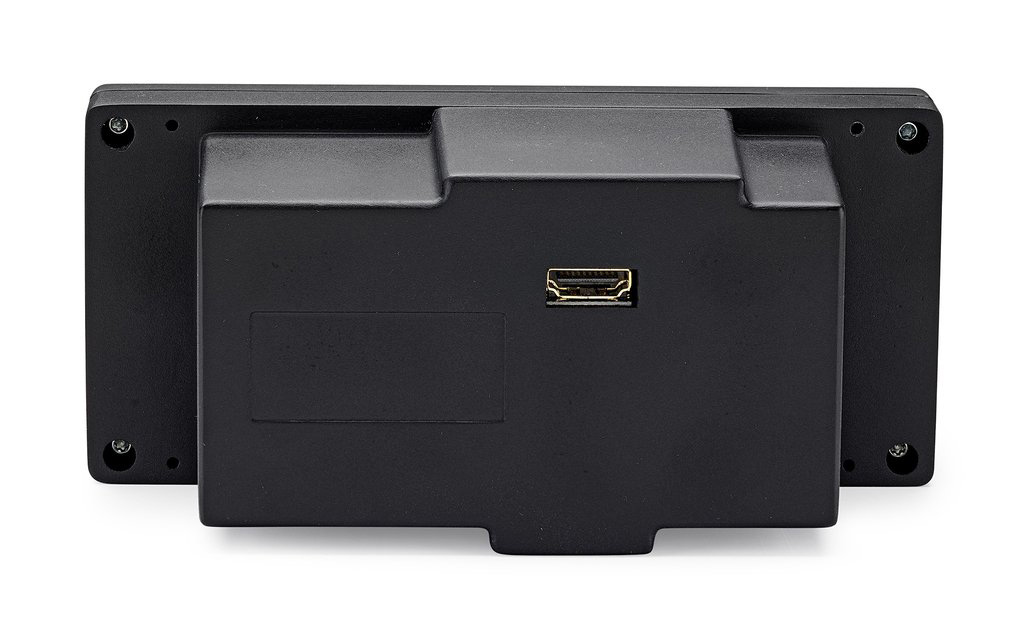


RealSimGear Garmin GNS430 Flight Simulator GPS Unit features:
The RealSimGear Garmin GNS430 provides ultra realistic buttons and knobs for use with the 430 GPS Nav/Comm. This is one of the most effective ways to learn the functionality of the Garmin 430, offering a far more realistic experience than using a mouse or touch screen.
This unit is especially helpful for learning and practicing instrument flying procedures in your personal flight simulator. When paired with virtual ATC services such as PilotEdge or VatSIM, it delivers an immersive and highly realistic training environment. Build familiarity with the Garmin 430 interface and controls so you are better prepared for real-world lessons with your CFII.
The unit features its own 3.5" LCD screen used to display the Garmin 430 pop-out screen from X-Plane. Installation is simple and requires no assembly. The unit can be panel mounted in your home simulator or used on your desktop with the optional stand.
Connects to your computer via HDMI. You can connect to any available DisplayPort, DVI, or HDMI port. If connecting to DisplayPort or DVI, you can use a compatible adapter or cable (not included, available separately).

If you find a better price elsewhere on this product we will Match that price and beat it by 10% of the difference. See Details.

Purchase today and you can return it in the original condition through Sunday, November 8, 2026! See our return policy.
RealSimGear Garmin GNS430 Flight Simulator GPS Unit features:
The RealSimGear Garmin GNS430 provides ultra realistic buttons and knobs for use with the 430 GPS Nav/Comm. This is one of the most effective ways to learn the functionality of the Garmin 430, offering a far more realistic experience than using a mouse or touch screen.
This unit is especially helpful for learning and practicing instrument flying procedures in your personal flight simulator. When paired with virtual ATC services such as PilotEdge or VatSIM, it delivers an immersive and highly realistic training environment. Build familiarity with the Garmin 430 interface and controls so you are better prepared for real-world lessons with your CFII.
The unit features its own 3.5" LCD screen used to display the Garmin 430 pop-out screen from X-Plane. Installation is simple and requires no assembly. The unit can be panel mounted in your home simulator or used on your desktop with the optional stand.
Connects to your computer via HDMI. You can connect to any available DisplayPort, DVI, or HDMI port. If connecting to DisplayPort or DVI, you can use a compatible adapter or cable (not included, available separately).

 Verified Purchase Verified Purchase
Q: Can I use this to control the GNS 530 or GNS 430 in the basic Cessna C172 in MSFS 2024? I fly VR and need an easier way to load approaches and comm and nav frequencies than the keyboard/mouse.
A: Yes, you can use the RealSimGear GNS430 with MSFS 2024 including the default Cessna C172.
Q: i just ordered this to use with X-Plane 12. The review said it works with X-Plane will it work with v12?
A: Yes, this is compatible with X-Plane 12.
Q: I have the Logitech flight system simulator set up, will this tether into that?
A: Yes, this will work on a system with the Logitech Flight Simulator hardware.
Q: Will this unit work on a fully functioning unit for a certified aircraft?
A: No. This is for flight simulators only.
Q: Can I please get complete dimensions of unit . Thank you
A: The RealSimGear GNS430 device measures 158mm wide x 72mm and sits 22mm in front of the desktop bracket or panel surface.
Q: What is a bezel?
A: The RealSimGear Garmin GNS430 bezel provides ultra realistic buttons and knobs for use with the 430 GPS Nav/Comm. This is the best way to learn the functionality of the Garmin 430 and is much more realistic than using the mouse or a touch screen.
Q: Does this work with X-plane?
A: Yes, this is compatible with X-Plane 11.
Q: Will it work with Microsoft flight sim 2020 ? .
A: Yes, this will work with Flight Simulator 2020. It is compatible with MSFS2020 with any aircraft that features a GNS (Cessna 172, Pipstrel Alpha, Cap 10, DA40-TDI).
Securely hold your RealSimGear avionics, providing a stable and elevated mounting position similar to how these units are installed in an airplane.

The stand provides a stable, elevated mounting position for the GNS430.

This is the best way to learn the functionality of the Garmin 530 and is much more realistic than using the mouse or a touch screen.

The ultimate RealSimGear bundle! Includes both the GNS430 and GNS530 Bezel systems, and the dual stand.
If you find a better price elsewhere on this product we will match that price and beat it by 10% of the difference.
Purchase today and you can return it in the original condition through Sunday, November 8, 2026 ! See our return policy.


