




-
- List Price:
- Item #5474
- PN: 945-000022
- In Stock
- List Price:
- Item #5474
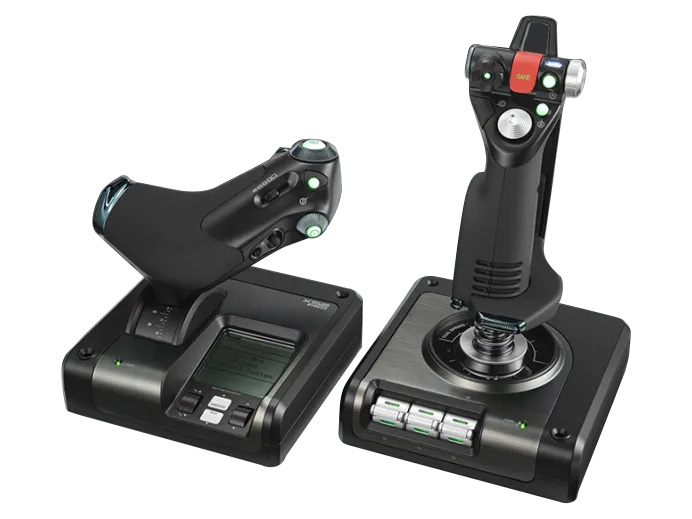
The most fully integrated Stick and throttle flight controller: built to meet the demands of the best virtual pilots in the world!
The MFD screen, first introduced on the X52 Flight Controller, is now interactive. Now you can display important in-game information such as the Radio Stack and interact with your games directly. There’s also a Software Development Kit (SDK) included which allows budding programmers to create interactions with their own favourite games.
Chose between night-friendly red, green or amber illumination for the different LED buttons on the controller. Using the SDK, you can also program the LEDs to react to conditions in your game such as flashing red during a stall or changing colour when pressed. Now there’s a huge number of possibilities for even greater interaction between your controller and the simulation.
New metal parts increase durability and the unique dual-spring mechanism provides a progressive spring force on the stick’s movement, making it more resistant the further you move it from centre. The X52 Pro uses the same magnetic hall sensor, non-contact technology as the X52 but we’ve doubled the number of sensors to improve response. The smooth movement and enhanced control give you unparalleled accuracy and bring you even closer to reality.
Joystick
- Precision centering mechanism, non-contact technology on X and Y axes and constant spring force reduce free play, improve control and increase durability
- 2-stage metal trigger; 2 primary buttons in 1 convenient position
- 4 fire buttons including missile launcher with spring-loaded safety cover for instant access
- Conveniently positioned metal pinkie switch provides shift functionality to double up on programmable commands
- 2 X 8-way Hat Switches
- 3D rudder twist
- 3-position rotary mode selector switch with LED indicators
- 3 spring-loaded, base-mounted toggle switches for up to 6 programmable flight commands
- 5-position handle adjustment system to suit all hand sizes
Throttle
- Progressive throttle with tension adjustment, detents for afterburner and idle
- 2 fire buttons
- Scroll wheel with built-in button
- Mouse controller / hat switch with left mouse button
- 8-way hat switch
- 2 x rotary controls
- Smooth-action slider control
- Clutch button initiates ‘safe mode’ to allow on-the-fly profile selection, or to display button functionality without activating
Works with:
Windows Windows 7, Windows 8.1, Windows 10, Windows 11
Compatible with FSX,
Microsoft Flight Simulator 2020, X-Plane, and Prepar3D.
Connectivity: USB 2.0
Lowest Price Guaranteed!

If you find a better price elsewhere on this product we will Match that price and beat it by 10% of the difference. See Details.
Buy with Confidence!

Purchase today and you can return it in the original condition through Monday, July 13, 2026! See our return policy.
- In Stock
- List Price:
- Item #5474
- PN: 945-000022
Logitech Saitek X52 Pro Flight Control System Overview:
The most fully integrated Stick and throttle flight controller: built to meet the demands of the best virtual pilots in the world!
The MFD screen, first introduced on the X52 Flight Controller, is now interactive. Now you can display important in-game information such as the Radio Stack and interact with your games directly. There’s also a Software Development Kit (SDK) included which allows budding programmers to create interactions with their own favourite games.
Chose between night-friendly red, green or amber illumination for the different LED buttons on the controller. Using the SDK, you can also program the LEDs to react to conditions in your game such as flashing red during a stall or changing colour when pressed. Now there’s a huge number of possibilities for even greater interaction between your controller and the simulation.
New metal parts increase durability and the unique dual-spring mechanism provides a progressive spring force on the stick’s movement, making it more resistant the further you move it from centre. The X52 Pro uses the same magnetic hall sensor, non-contact technology as the X52 but we’ve doubled the number of sensors to improve response. The smooth movement and enhanced control give you unparalleled accuracy and bring you even closer to reality.
Joystick
- Precision centering mechanism, non-contact technology on X and Y axes and constant spring force reduce free play, improve control and increase durability
- 2-stage metal trigger; 2 primary buttons in 1 convenient position
- 4 fire buttons including missile launcher with spring-loaded safety cover for instant access
- Conveniently positioned metal pinkie switch provides shift functionality to double up on programmable commands
- 2 X 8-way Hat Switches
- 3D rudder twist
- 3-position rotary mode selector switch with LED indicators
- 3 spring-loaded, base-mounted toggle switches for up to 6 programmable flight commands
- 5-position handle adjustment system to suit all hand sizes
Throttle
- Progressive throttle with tension adjustment, detents for afterburner and idle
- 2 fire buttons
- Scroll wheel with built-in button
- Mouse controller / hat switch with left mouse button
- 8-way hat switch
- 2 x rotary controls
- Smooth-action slider control
- Clutch button initiates ‘safe mode’ to allow on-the-fly profile selection, or to display button functionality without activating
Works with:
Windows Windows 7, Windows 8.1, Windows 10, Windows 11
Compatible with FSX,
Microsoft Flight Simulator 2020, X-Plane, and Prepar3D.
Connectivity: USB 2.0
34 CUSTOMER REVIEWS
Logitech Saitek X52 Pro Flight Control System
34 Reviews
- Average Customer Review:
-
Top Reviews
 Verified Purchase
Elite Piloting
- By Fen from Austin Tx on Wednesday, March 4, 2026
- Pros: Enough buttons, sliders, toggles for elite gamers. Very easy to customize
- Review: Been using Satiek x52 for over 10 years. Best on the market and very easy to customize. I game very hard so I replace it every 2-3 years but its worth the edge it gives me
 Verified Purchase
My X 52 Pro
- By Scotty from Stagecoach NV USA on Saturday, June 7, 2025
- Pros: The X 52 pro works well and has a lot of programmable functions.
-
Review:
I would’ve given this product a 4.5 rating, but it was not possible. Overall, I really like the stick and the separate throttle. It works well and has quite a few programmable buttons..
I felt the joystick was a little loose, but an aftermarket shim fixed it right up. Remember if you do that, you must bolt or screw it down to a table.
- Verified Purchase
- By on Thursday, December 15, 2022
- Pros:
-
Review:
got one 4 years ago use it all most every day just now the button started to act up so order a new one great price good shipping great store !!!
- Verified Purchase
I enjoyed this combo so much I am purchasing it again
- By JOSEPH POTCH from Northern California on Saturday, February 27, 2021
- Pros: Everything for me is a pro
-
Review:
I just ordered the new x52 pro flight system and am looking forward to the freedom of flying at home again.
Due to an injury I was not able to fly for a while. As it was the old combo just wore out.
Some of the switches just stopped working and the throttle was sticking. The joystick though, still worked like new. I wound up taking it apart and seeing what it was made of and I was really impressed with the construction and the maze of wires. No pinched wires though. I hope the new one is as good as my first.
I have read many reviews and honestly I have never had any of the problems some people have mentioned. I may have been lucky or due to taking time to program and setup the system may have made a difference. i am not sure but I am hoping I am as fortunate with the new system and before. I will update this if I run across any notable situations, but don't expect any. After this I am finally going to get the pedals that will complete the flight sims realism.
BTW, i fly XPLANE, Microsoft Flight Sim, and my long time favorite IL2 with the new BAT modifications.
- Verified Purchase
Worth every penny
- By Tony M. from Bozeman MT USA on Wednesday, October 14, 2020
- Pros: Smooth movements. Lots of customization.Great feel and responsiveness.
- Review: The X52 is everything it says it is and more. I don't see it written very much about how this HOTAS system "feels". The absolute smoothness of the joystick and the buttery soft movement of the thruster changed the way I play flight simulators. It made my old(but excellent) MS Sidewinder feel like I had been flying with "stone knives and bearskins". I really enjoy all the customizations available thru the control software and it makes switching ships in ED a lot easier when changing from mining to combat. I'm really glad I decided to go with this model.
- Verified Purchase
impressed
- By scott from Napoleon OH USA on Wednesday, June 17, 2020
- Pros: great works better then the others iv hade
- Review: 5 stars
 Verified Purchase
Need of Improvement
- By Derrick from Chehalis WA USA on Friday, April 28, 2017
- Pros: Programmable buttons and switches at fingertips
- Review: I bought a new joystick because my old X45 wouldn't center. However, the new one seems to have a soft spring design and so it tends to have a slight bit of play in the center; therefore, I have to unplug it when not in use because it interferes with other games. I bought another Saitek vs. a yoke due to the versatility of all the programmable buttons on the flight sticks, but I think Saitek needs to re-engineer the spring tension design from scratch.
Elite Piloting
- By Fen from Austin Tx on Wednesday, March 4, 2026
- Pros: Enough buttons, sliders, toggles for elite gamers. Very easy to customize
- Cons: Don't be rough with it
- Review: Been using Satiek x52 for over 10 years. Best on the market and very easy to customize. I game very hard so I replace it every 2-3 years but its worth the edge it gives me
- Was this review helpful to you? Yes No 1 Other people found this review helpful.
- Verified Purchase
My X 52 Pro
- By Scotty from Stagecoach NV USA on Saturday, June 7, 2025
- Pros: The X 52 pro works well and has a lot of programmable functions.
- Cons: The throttle box was wider than I would like and it had a much longer throw then I’m accustomed to.
- Review:
I would’ve given this product a 4.5 rating, but it was not possible. Overall, I really like the stick and the separate throttle. It works well and has quite a few programmable buttons..
I felt the joystick was a little loose, but an aftermarket shim fixed it right up. Remember if you do that, you must bolt or screw it down to a table.
- Was this review helpful to you? Yes No 1 Other people found this review helpful.
- Verified Purchase
I enjoyed this combo so much I am purchasing it again
- By JOSEPH POTCH from Northern California on Saturday, February 27, 2021
- Pros: Everything for me is a pro
- Cons: Just wished the button and switches lasted another 10 years.
- Review:
I just ordered the new x52 pro flight system and am looking forward to the freedom of flying at home again.
Due to an injury I was not able to fly for a while. As it was the old combo just wore out.
Some of the switches just stopped working and the throttle was sticking. The joystick though, still worked like new. I wound up taking it apart and seeing what it was made of and I was really impressed with the construction and the maze of wires. No pinched wires though. I hope the new one is as good as my first.
I have read many reviews and honestly I have never had any of the problems some people have mentioned. I may have been lucky or due to taking time to program and setup the system may have made a difference. i am not sure but I am hoping I am as fortunate with the new system and before. I will update this if I run across any notable situations, but don't expect any. After this I am finally going to get the pedals that will complete the flight sims realism.
BTW, i fly XPLANE, Microsoft Flight Sim, and my long time favorite IL2 with the new BAT modifications.
- Was this review helpful to you? Yes No 4 Other people found this review helpful.
- Verified Purchase
Worth every penny
- By Tony M. from Bozeman MT USA on Wednesday, October 14, 2020
- Pros: Smooth movements. Lots of customization.Great feel and responsiveness.
- Cons: Pricey.
- Review: The X52 is everything it says it is and more. I don't see it written very much about how this HOTAS system "feels". The absolute smoothness of the joystick and the buttery soft movement of the thruster changed the way I play flight simulators. It made my old(but excellent) MS Sidewinder feel like I had been flying with "stone knives and bearskins". I really enjoy all the customizations available thru the control software and it makes switching ships in ED a lot easier when changing from mining to combat. I'm really glad I decided to go with this model.
- Was this review helpful to you? Yes No 11 Other people found this review helpful.
- Verified Purchase
impressed
- Verified Purchase
Need of Improvement
- By Derrick from Chehalis WA USA on Friday, April 28, 2017
- Pros: Programmable buttons and switches at fingertips
- Cons: Weak Centering Spring Design
- Review: I bought a new joystick because my old X45 wouldn't center. However, the new one seems to have a soft spring design and so it tends to have a slight bit of play in the center; therefore, I have to unplug it when not in use because it interferes with other games. I bought another Saitek vs. a yoke due to the versatility of all the programmable buttons on the flight sticks, but I think Saitek needs to re-engineer the spring tension design from scratch.
- Was this review helpful to you? Yes No 4 Other people found this review helpful.
6 QUESTIONS & ANSWERS
Previously Asked Questions
-
Sunday, August 18, 2024
Q: is there a way to mount to the edge of a desk so it doesnt move?
A: It comes with suction cup mounts and screw holes.
-
Friday, January 20, 2023
Q: Will this flight controller work with a ps5?
A: No, this is for PC only.
-
Sunday, August 28, 2016
Q: Does it work with Windows 10
A: Yes, this is compatible with Windows 10.
-
Monday, November 29, 2010
Q: Is this joystick and throttle work on 64 bit?
A: Yes, it will work on 64-bit XP, Vista, and Windows 7.
-
Wednesday, February 24, 2010
Q: will this program work with windows vista home premium?
A: Yes it will.
-
Wednesday, November 5, 2008
Q: Hello does this unit work with auto raceing or infintry sims
A: This should work with any program that allows interface with a USB controller.
Load More
Customers who bought this also considered:
Lowest Price Guaranteed!
If you find a better price elsewhere on this product we will match that price and beat it by 10% of the difference.
Buy with Confidence!
Purchase today and you can return it in the original condition through Monday, July 13, 2026 ! See our return policy.